Maxi-Hub Phyling
Maxi-Hub Phyling
Overview
The Maxi-Hub is the latest generation of the Phyling Hub, combining the features of a Hub that hosts the Phyling application with the advanced capabilities of the Maxi-Phyling. It lets you record and visualize data, and connect all types of sensors, wired or wireless.
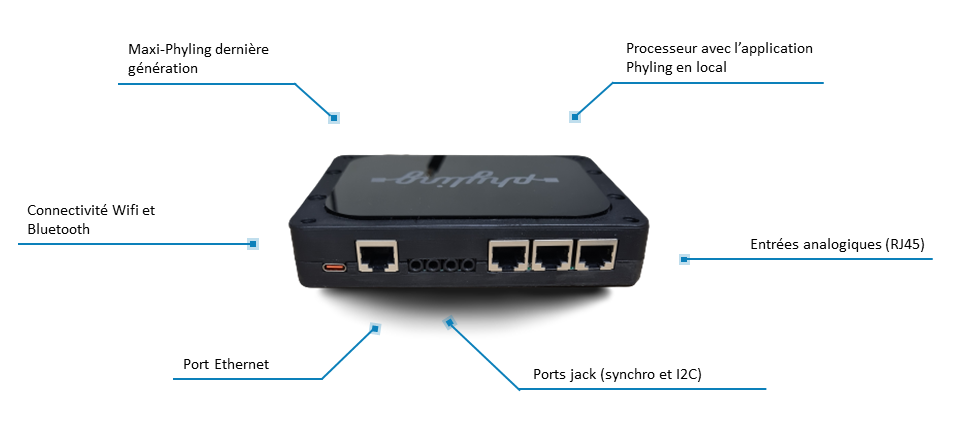
Technical specifications
| Specification | Value |
|---|---|
| Dimensions | 140x110x30 mm |
| Weight | 350g |
| Power | Mains power or external USB-C battery |
| Connectivity | Wifi, Bluetooth (BLE), wired with 1 Ethernet port, 3 analog RJ-45 ports and 4 jack inputs (2 sync and 2 I2C) |
| Sampling rate | Up to 1kHz |
| Onboard sensors | 3-axis accelerometer, 3-axis gyroscope, multi-band GPS (10 Hz) |
Connectors
A large number of sensors can be plugged into the back of the Maxi-Hub.
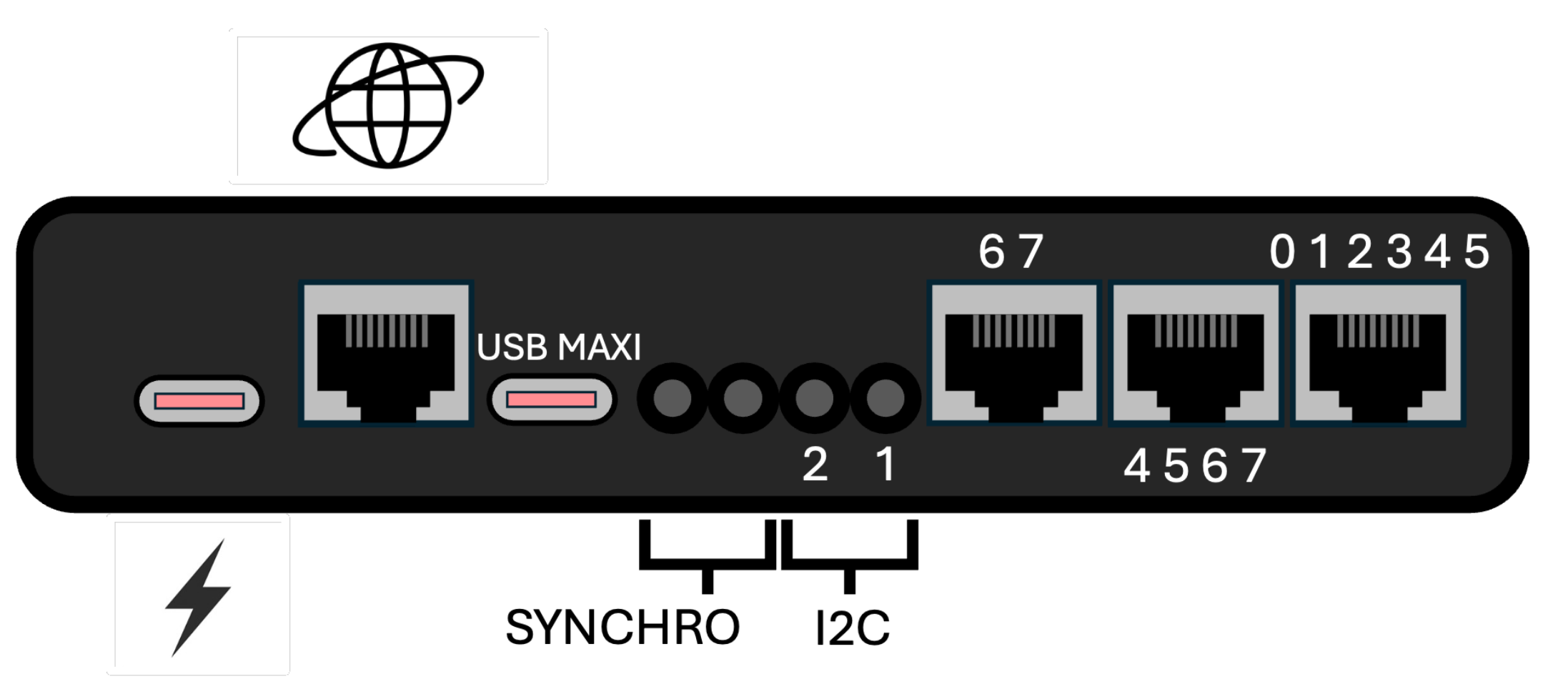
The three RJ45 sockets on the right give access to the measurement channels (ADC) of the built-in Maxi-Phyling. As shown in the diagram, each socket reads some of the eight available measurement channels.
Quick start
Plug in the USB-C power cable: the Hub turns on automatically (white LED). The Hub LED turns green as soon as it is initialized.
To turn on the Maxi-Phyling, press the ON/OFF button on the right; the LED on the right turns green. To start a recording, press the REC button; the LED then turns blue.
To access the application, connect to the Maxi-Hub Wifi network and enter the address http://192.168.1.42 in your favorite web browser.
Powering the Hub
The Hub is configured at the Phyling workshop before delivery. Simply plug it into the mains. Make sure to use the power supply provided by Phyling for optimal operation. To turn off the Hub, press the Hub's ON/OFF button.
Internet connection
Use an RJ45 cable between the Maxi-Hub and your Wifi router to access the Internet while staying connected to the Hub's Wifi network.
Using the Maxi-Phyling
Refer to the Maxi-Phyling section for the user guide of the Maxi-Phyling built into the Maxi-Hub.
Switching from Hub mode to Case mode
Once plugged into the Case (Mallette), the Maxi-Hub must communicate with the Wifi router to extend its range. To do so, press and hold the Hub's start button until a purple LED lights up. You can then release it and let the Hub restart. To check the Hub's state, the Maxi-Hub's green LED blinks once every ten seconds, which means it is in Case configuration. If the LED does not blink, it is in standard Hub mode.