Release notes
Release notes
This section presents the new features, improvements and bug fixes for each update of our application.
v7.0.6
Update of 10/09/2026
New features
- [LTE] 🔥 Added a Wi-Fi operating mode and a hotspot mode for configuration
- [LTE] 🔥 Added the IMU module and real-time yaw, pitch and roll calculations
- [LTE] Added calibration modules built into the sensor, which can be launched from the cloud application
- [LTE] Added connections to commercially available heart rate sensors and power meters
- [APP] 🔥 Set up a webhook system for OAuth applications, to send updates about recordings and users
Improvements
- [APP] Automatic detection of errors in JSON configuration files
- [APP] Improved the sensor configuration menu
- [APP] Improved the Wi-Fi network configuration menu
- [MAXI] Added a system to recover real-time data after a connection loss
- [MAXI] Improved automatic Wi-Fi network switching when the connection is weak and several networks are available
- [APP] Added filters in the Phyling sensor management menu, with synchronization with Meca sensors
Bug fixes
- [MAXI] Improved reliability with several BLE sensors connected
- [MAXI] Various bug fixes
- [APP] Fixed the tare calibration for modules with a 3D calibration (3-axis platform, IMU, etc.)
v7.0.5
Update of 07/07/2026
New features
- [LTE] 🔥 Created a new Phyling-LTE device type for streaming over 4G LTE-M
- [APP] 🔥 Added real-time and analysis polar plots for the Phyling crankset and Pi3D
- [MAXI] Added an automatic BLE scan system on the Maxi-Phyling
Improvements
- [MAXI] New powermeter module to retrieve power/cadence data from external sensors over BLE.
- [MAXI] New xsens module to connect an xsens pod to the Maxi-Phyling
- [APP] Improved UX on app.phyling.fr: you now have to press Esc twice to leave a recording visualization, and closing the visualization with Esc is prevented while a submenu is open.
- [APP] Added a special crankset calibration to set up a top-turn and tare the forces
- [ANALYSE] Added a selection_num column in CSV exports to give the corresponding selection number
- [ANALYSE] Integrated pressure mats into the CSV data export.
Bug fixes
- [APP] Fixed a file upload bug in admin
- [APP] Fixed device filters in admin
- [APP] Fixed a lost file bug when re-downloading data from a Maxi-Phyling
- [APP] Improved API latency for routes with filters
- [APP] Improved database synchronization speed
- [APP] Data download from the Maxi-Phyling is now automatically paused during recordings
- [ANALYSE] Fixed a bug with GPS data (half-invalid data)
- [APP] When updating the calibration of a V2 Crankset from a Garmin/Polar watch, the calibration was not properly reloaded from the application
v7.0.4
Update of 22/05/2026
New features
- [MINI/MAXI] 🔥 Automatic synchronization of calibrations between the Mini-Phyling and the Maxi-Phyling
- [APP] 🔥 Added the Reseller role in the application to manage several clients
- [APP] 🔥 Added OpenFreeMap map visualizations
- [APP] Added the device simulation pod (Maxi-Phyling) for demos and tests
- [APP] Added e2e tests on releases
Improvements
- [APP] Optimized the real-time tab (less data loss, better responsiveness)
- [APP] Optimized overall application speed
- [MINI] Automatic time setting of Mini-Phyling with GPS
- [APP] Finer management of access rights for OAuth2 applications
- [ANALYSE] Added the average power over 1 and 3 seconds in real time for Cycling
- [APP] Added sorting by serial number, date, etc. in the sensor, Meca sensor and hub visualization pages
Bug fixes
- [APP] Fixed the upload of an Excel file with a list of athletes
- [APP] Fixed file sharing via URL for a user who is not logged in
- [APP] Fixed zooming and panning in the visualization
- [APP] Disabled the creation of multi-group sessions and auto-filling of athletes and sports
- [APP] Fixed race conditions during API searches (users, devices, etc.)
- [APP] Fixed a bug in data downloads / re-downloads on the Maxi-Phyling
- [APP] Fixed a bug when editing clients
- [MAXI] Fixed the ADC stuck at 1.25 V
- [NANO/MINI/MAXI] Fixed the 1 m/s² "spikes" in high-frequency IMU data
v7.0.3
Update of 03/04/2026
New features
- [APP] 🔥 New real-time interface with new charts.
- [APP] 🔥 New visualization interface allowing several charts to be displayed simultaneously, with support for new chart types (pressure mat).
- [APP IOS] 🔥 New iOS application to record data from the Mini and Nano-Phyling.
- [MINI] Added a GPS module to the Mini-Phyling.
- [LIB PYTHON] 🔥 Support for several simultaneous BLE sensors and support for the Mini-Phyling.
- [LIB PYTHON] Added the
json2csvfunction to decode a file and convert it into a DataFrame (CSV). - [APP] Added a lock mode on real time, allowing you to take control of Maxi-Phyling devices and restrict access for other users (see https://docs.phyling.fr/en/software/realtime.html).
- [APP] Added a button to make selections on several recordings at the same time.
Improvements
- [APP] Improved API responsiveness.
- [APP] Possibility to share a link to a recording from the visualization page.
- [APP] Added sensor stock management in the administration interface.
- [APP] The analysis of V2 Cranksets now uses the calibration parameters of the Mini-Phyling.
Bug fixes
- [APP] Optimized the reloading of recordings in the data page.
- [APP] Database synchronization: improved synchronization speed.
- [APP] Database synchronization: added synchronization of API keys and OAuth applications.
- [APP] Fixed a 3D calibration bug for 3-axis platforms.
- [APP] Improved detection reliability on V2 Cranksets.
- [APP] Removed the "Cycling start" scenario.
- [APP] Fixed the search in multiple selection bars
v7.0.2
Update of 22/01/2026
Improvements
- [APP] Improved top-turn detection on V2 Cranksets
- [APP] Added the Gyroscope tare on the Nano-Phyling with the Phyling python lib
- [APP] Use of PostgreSQL as the main database
Bug fixes
- [MAXI] Fixed a data download bug when the Maxi-Phyling is reset
- [APP] Bug fixes in scenarios
v7.0.1
Update of 19/12/2025
New features
- [MINI] 🔥 Created a real-time algorithm for Look cranksets + sending of power / cadence to Garmin and Polar bike computers.
- [APP] 🔥 Release of the open source Phyling Python library and publication of the developer documentation.
- [APP/MAXI] Added a system to configure real-time indicators on the Maxi-Phyling (IMU, GPS, ADC, Mini-Phyling, etc.).
- [APP] Implemented the OAuth2 and API Key systems to connect external interfaces to the Phyling application or to Maxi-Hubs.
Improvements
- [APP] Optimized real-time performance.
- [ANALYSE] Added a
T_normfield to compare stroke times in rowing. - [APP/MAXI] New simplified menu to edit the Wi-Fi networks of a Maxi-Phyling.
- [APP] Added a link to the associated documentation for specific analyses (pi3d, rowing, etc.).
- [APP] Automatic deletion of unassociated data after 1 month.
- [MAXI] Support for a sampling frequency below 1 Hz.
- [APP] Added a notification when some indicators are hidden.
Bug fixes
- [APP] Fixed the tare of phyplates in scenarios
- [APP] Minor fixes on strength training scenarios.
- [MAXI] Added a "no battery" mode.
- [MAXI] Added log level selection.
- [MAXI/MINI] 🔥 Major change on the Mini-Phyling: Mini v7.0.1 devices are incompatible with all earlier versions of the Maxi-Phyling.
v7.0.0
Update of 17/10/2025
New features
- [APP] 🔥 Major v7 update:
- Maxi-Phyling devices now communicate with the application via the MQTT protocol
- Maxi-Phyling devices can now connect directly to the app.phyling.fr server
- ⚠️ To work in v7.x.x, Maxi-Phyling devices must be updated via hotspot mode and will no longer be able to connect to hubs in v6.x.x
- [ANALYSE] 🔥 Added session analyses and removed the "merge" mode (replaced by sessions)
- [APP] Added the Hop Test scenario
Improvements
- [MINI/MAXI] BLE update. Support for a new battery monitoring system (Maxi v3 and Mini v3 required)
- [APP] Improved the Nordic and Isometrics scenarios in the real-time visualization
- [APP] Redesigned the application settings interface (Settings tab)
v6.6.6
Update of 25/06/2025
New features
- [MINI] 🔥 Added detection algorithms for saving data packets
- [MINI/MAXI] Download of BLE data lost at the end of a recording ("recovery" mode)
- [APP] Added a tab to manage Meca Sensors
- [APP] Video compression and conversion (frontend side)
- [APP] Created a "Session" type to group several recordings
- [ANALYSE] Added a
phylingpackage with the decoder, scripts for communication with the API and BLE communication with the Nano-Phyling
Improvements
- [MAXI] Changes to the hotspot mode
- [MAXI] Updated the BLE lib (Nimble v2.3.1)
- [APP] 🔥 Updated the csv export format to ensure compatibility with Dartfish for all sports
- [APP] 🔥 Added a Heart rate sensor using only its name (MAC address no longer needed)
- [APP] Improved recording time management by saving the timezone in the db
- [APP] Changed the associated data table (added a Type column and removed the Favorite column)
- [APP] Added the selection number in the csv file name of a selection
- [ANALYSE] PI3D: forces in kg rather than Newtons
Bug fixes
- [ANALYSE] Bug in Rowing reports: the "Average boat acceleration patterns for each 500m" chart is missing from some reports
- [MAXI] Bug during the "Tare" calibration
- [APP] Bug with the "Reset the Hub" button
v6.6.4
Update of 03/04/2025
New features
- [ANALYSE] 🔥 Added a scenario with analysis and pdf report for instrumented cleats
- [APP] 🔥 Added a task system for long operations (pdf generation, decoding, etc.)
- [APP] Created Sessions to group several recordings
Improvements
- [APP] 🔥 Filter recordings directly by athlete without a group filter
- [APP] Removed Coaches from the athlete list
- [APP] Search bar for users, scenarios, sports, etc.
- [APP] Maxi-Phyling update binary file downloadable for Managers in Settings/Releases
- [APP] Added a detailed description of indicators for rowing, kayak and cycling
- [MINI/MAXI] Mini-Phyling module names are renamed automatically
- [MAXI-HUB] Very long press (10s) to switch to hub mode
- [ANALYSE] Calculation of Euler angles (yaw, pitch, roll) for all IMU-type sensors
- [ANALYSE] Added the Pull exercise to the Target speed scenario
Bug fixes
- [MAXI] Record synchronization bug between Mini-Phyling and Maxi-Phyling
- [APP] Socket connection bug
- [ANALYSE] Updated the real-time cycling indicators to work with the Mini-Phyling V2
v6.6.3
Update of 24/01/2025
New features
- [MAXI] Added a menu in the hotspot interface to scan and add BLE sensors
- [APP] 🔥 Added an "active" parameter to manage user access to the application
- [ANALYSE] Rotation speed calculation by combining the gyroscope and the accelerometer to extend the measurement range
Improvements
- [MINI] Improved sampling frequency accuracy
- [MAXI] Use of the internal clock
- [MAXI] Retrieval of additional data on heart rate sensors (RR)
- [MINI/MAXI] Improved battery level estimation for the Mini and Maxi-Phyling
- [APP] Maxi-Phyling settings moved to the Real time tab
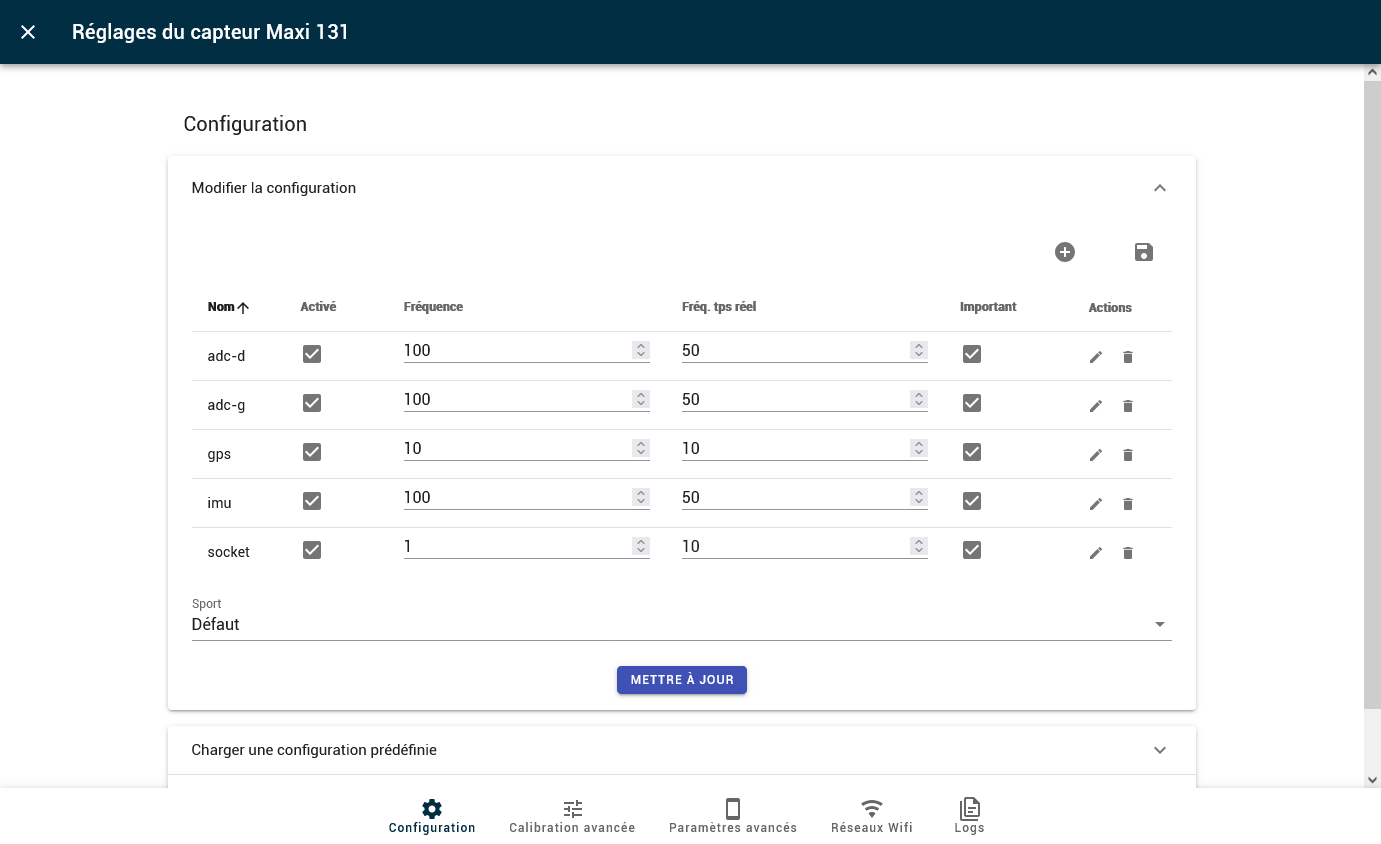
- [APP] Updated the interface for tablets and smartphones
- [APP] Added the commissioning date and a comment for Maxi-Phyling devices and Hubs
- [APP] Clarified the settings interface to configure a Hub
- [APP] Exercises associated with a Client rather than a group
- [APP] Terms of Use displayed at each login unless the "Do not show again" box is checked
- [APP] Added a detailed description of indicators in the indicators table for scenarios
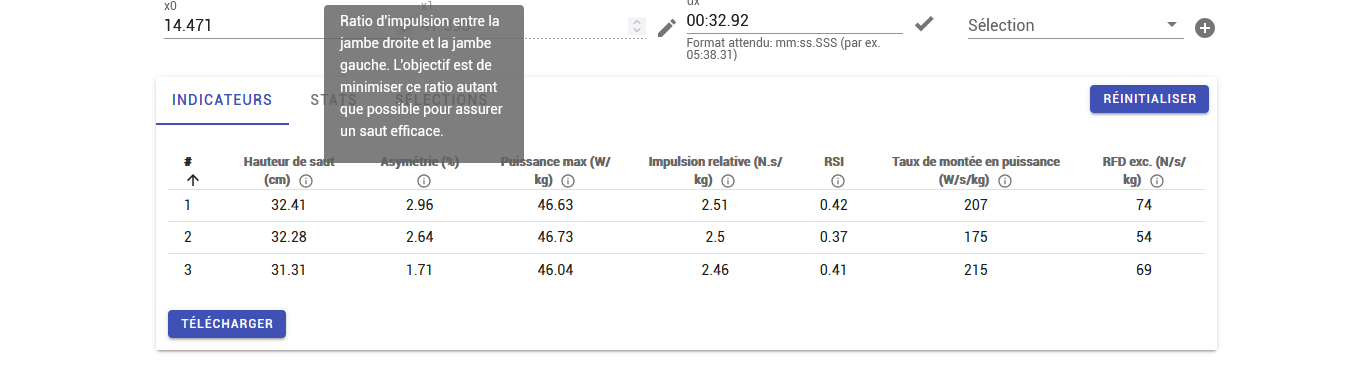
- [ANALYSE] Updated the analysis and calibration of 3D pedals
Bug fixes
- [MINI] Bug resetting the time at each power-on
- [MINI] Bug retrieving the config for some Mini-Phyling devices
- [MAXI] Bug in the automatic time update of a Maxi-Phyling by a Hub
- [APP] Display bug if calibrating 2 Maxi-Phyling devices at the same time
- [APP] Bug in the downloaded file name of the type
_filename.txt_
v6.6.2
Update of 22/11/2024
New features
- 🔥 Automatic Mini-Phyling -> Maxi-Phyling configuration. When a Mini-Phyling connects to a Maxi-Phyling, if the configuration on the Maxi-Phyling side is not correct (frequency, data, etc.), the Maxi-Phyling automatically reconfigures itself and restarts.
Improvements
- 🔥 Created an analysis algorithm for 3-axis pedals to measure many indicators.
- 🔥 Added a real-time indicator of jump height in CMJ.
- Notification in the application to update Maxi-Phyling devices.
- Added an error code system through LED blinking on the Mini-Phyling and Maxi-Phyling.
- English translation of the CMJ and Squat Jump scenario PDFs.
- 🔥 Improved rowing and kayak analysis by replacing the Haversine method with the Vincenty method for distance and speed calculation.
- Interface update:
- Added an admin menu.
- Updated the "settings" tab.
- Sorting of sensors when creating a configuration.
Bug fixes
- 🔥 Improved the accuracy of time synchronization between Mini-Phyling and Maxi-Phyling. For recordings where the Mini-Phyling sends its data to the Maxi-Phyling, the synchronization accuracy is ±5 ms.
- Optimized the execution speed of some actions in the interface (settings).
- Automatic update of the Maxi-Phyling time when connecting to the interface.
- The button to stop all recordings no longer stops scenarios.
- Fixed the bug: impossible to restart a scenario until the previous one has finished its analysis.
v6.6.1
Update of 07/10/2024
New features
- 🔥 Data upload to the Cloud: automatic association with an athlete using the Phyling sensor number in the name of the file to upload
- 🔥 New calibration system: analysis at the end of the calibration as for scenarios rather than in real time, and display of the calibration and calibration curves after the calibration
Improvements
- Recording time management: in the recording edit and upload menus, added a "Use the Phyling sensor time" checkbox
- Improved application rendering on mobile
- Added filters by recording type and scenario type
- Improved the algorithm for merging several recordings
- Improved physical training scenarios (merging of some methods common to scenarios using PhyPlates, etc ...)
- Maxi-Phyling restarts after an update
- Optimized the
get Clients,get Recordsroutes, etc ...
Bug fixes
- Mini-Phyling V2 bugs (2 Mini-Phyling with 2 different frequencies; when one of two Minis is lost, the other disconnects)
- Maxi-Phyling bug in hotspot mode in the Wifi tab
- Settings/Admin/Phyling Sensors: bug in the Mini / Maxi / etc ... filter
- In Manager mode, in the Phyling Sensors and Hubs tabs, the error "You are not administrator" appears
- In Coach/Athlete mode, the Hub tab is hidden in settings
- Compiled scenarios management: a Manager in cloud or mallette-online mode cannot do anything
- Phyling Sensors management: a Manager in cloud or mallette-online mode cannot do anything
v6.6.0
Update of 03/09/2024
New features
- 🔥 Mini-Phyling V2
- 🔥 Merging of files from several Maxi-Phyling and/or Mini-Phyling V2 with 4 merge types: GPS, recording start, sensor time, sync
- 🔥 New physical training scenarios for the PhyPlates (Drop Jump, Squat Jump and Isometrics) and for the PhyLift (Target speed and Force-Velocity Profile)
- Phyling sensors are now referenced with serial numbers (for example, Maxi:
10230259, Mini:20100360, Hub:30100070). It is possible to customize the name of a Maxi-Phyling - Added a Releases management menu for Admins
Improvements
Frontend
- Improved the Real time interface, notably for scenarios, with the ability to create a group or an athlete just before launching a scenario
- Improved the scenario management menu in Settings (scenario creation, test whether the class exists and management of scenario configs)
- Improved the Phyling Sensors and Hubs management menu (possibility to display passwords)
- Added the "Reset selections" option in the analysis relaunch menu
- Recalculation of selection statistics after a calibration or after relaunching the analysis
- Added the zoom options "Zoom on Y axis" and "Fit Y axis to data" in visualizations
Rowing
- Fixes in indicator calculations
- Added a port/starboard indication for roll and pitch in the pdf report and in the application
- DartFish-compatible csv export
- Pdf report: added an option for Average patterns in normalized time (% of cycle) or in time, and an option to choose the splitting distance for average patterns
Cycling
- Changed the method used to zero (back to the conversion application's method)
Tennis
- Added a pdf report
- In real time, fixed curve color with a slightly thicker line
Bug fixes
- Scenario real-time bug: you have to wait for the duration of the previous scenario to get real time
- Screenshot bug in Comparison mode: it is no longer possible to select / deselect records afterwards
- Bug with offsets in Comparison mode: the zoom resets after validating an offset
- Exercise bug during data upload: sometimes the exercise is not taken into account or the previous one is used ...
- Date/time bug during data upload
v6.5.3
Update of 27/05/2024
New features
- 🔥 Zoom in comparison charts
- Visualization: added an "Align zeros" button for when there are several Y axes
- 🔥 Cropping of a recording ("Trim" button) to view only the area of interest of the recording and avoid overly long loading each time it is opened
- 🔥 New Hotspot mode
Improvements
Mini & Nano Phyling
- Mini-Phyling V2 code
- Mini-Maxi time synchronization
- Maxi-Phyling: test of espressif32 v6.6.0
Real time
- Indicator calculation in Cycling: changed the real-time Power calculation (from the top-turn for cycle calculation)
Backend
- Maxi-Phyling and Mallette admin interface:
- Added a "comment" field
- Do not select the client when changing that of a Maxi-Phyling
- Select the clients associated with a mallette from the Mallette table
- Data visualization: instead of saving the last viewed file locally, the last X MB of files are saved (for example the last 4 files)
- Added a
cloud_enabledfield for clients to prevent users of a client without the cloud from connecting to it
Frontend
- Sending data to SDH/Nolio: the window no longer closes when clicking Send
Analysis
- Kayak: DartFish-compatible csv export
- Golf: analysis update
Bug fixes
- If real time is enabled and the tab is changed, the route that removes all real-time variables is not called
- Maxi-Phyling: sometimes Mini-Phyling devices are displayed as connected in the interface but no data is retrieved in record
- Bug related to record caching: when the analysis is relaunched, the record must be removed from memory
- Data filter: a client's groups disappear when the page is reloaded
- v-footer not visible on Safari and sometimes on Chrome
v6.5.2
Update of 29/03/2024
New features
Nano-Phyling
- Mini - maxi time sync & multi connection
- Data sent only during records (BLE notification)
Real time
- Simulation mode: new script script_simu.py as in MaxiBack
- Real-time indicator calculation in Cycling (Power, Cadence, Speed, Torque)
- In the interface, Maxi-Phyling shown in blue in the bottom bar when the Maxi-Phyling is recording
- Added real-time indicators for scenarios
- Added a selection button for all Maxi-Phyling devices at the same time
Backend
- 🔥 Possibility to update a Maxi-Phyling from the interface
Analysis
- Added the Tennis scenario
Improvements
Backend
- Automatic sending option to Nolio / SDH for each platform
Frontend
- Fixed Y scale defined according to the variables to display in Real time and Data
- Rowing: added the acc_x chart first in all visualizations
Analysis
- Changes to the CMJ and Nordic scenarios with the addition of Mean and Standard deviation rows in the CMJ jump table and Nordic repetitions
- Cycling:
Theta_0parameter accessible for the angle calculationcoeff_gandcoeff_dparameters defined as basic parameters (for miniphyling analysis)- Heart rate data added to the Nolio export
Bug fixes
Backend
- Database backup:
- In the excel file, there is information about clients other than the Manager's client in the Sensor tab
- Do not add configs linked to a scenario
- Bug with special characters in the exercise name for data export
- Cloud: in Manager mode, impossible to edit a Maxi-Phyling to associate an athlete with it
- Import: the recording is automatically set as favorite
Frontend
- When there are 2 Maxi-Phyling devices in the interface and a scenario is launched on one, the interface prevents starting / stopping scenarios on the other (as if it were disconnected)
- Automatic association: the group sometimes removes itself
- Client filter bug in Data
- Creating a selection with the
sshortcut -> continuous creation of selections when the key is held down - Chart color bug when zooming on an area where data is missing
- When a Maxi-Phyling appears in the Real time tab and is already recording, the time starts at 0; the page must be reloaded for the correct time to be displayed
Analysis
- Ergocycle V2: tare bug at the start of the scenario
- i18n bug on real time
- The
AUTO_DECODEparameter is no longer taken into account - Cycling: bug in the angle calculation related to the
wsize_eparameter
v6.5.1
Update of 07/02/2024
New features
- 🔥 Added keyboard shortcuts (Switch between tabs, etc ...)
- New Maxi-Hub with ESP32
Improvements
Frontend
- New curve colors in the Visualization
Analysis
- CMJ and Nordic scenarios updated
- GPS indicators (nSat, PDOP, gps time, etc ...) available in the analysis
- Kayak: added the acc_x vs speed_i chart
Bug fixes
- Ergocycle bugs
- Crash without an error message when uploading a zip record with a user that does not exist
- Crash when importing a record of the ergocycle scenario type
- Bugs for the Mallette-online mode
- Interface bug: when viewing data at the end of a scenario, we are still in the Real time tab and cannot download a pdf report.
- In Data, for the Maxi-Phyling filter, the devices are not in order
v6.5.0
Update of 17/01/2024
New features
- Ergocycle V2
- 🔥 Nano-Phyling: 1st working code
- Real time: a new button to define selections in real time
- 🔥 Non-blocking pdf generation
- 🔥 Data download as a zip with raw data and metadata (information about the recording and selections)
Improvements
Maxi
- Sending to the Maxi the variables to send in real time to optimize data communication
Real time
- Interface improvement:
- When launching a scenario, if the Maxi-Phyling is associated with an athlete, the athlete field is filled in automatically
- Added a button to easily associate an athlete with a Maxi-Phyling
- Simplified status
- Smoother real-time curve visualization
Backend
- Automatic Mallette -> Cloud synchronization (with an activation switch in Settings/General)
- In the Maxi-Phyling, the data.txt file is renamed with the folder name (for example
192_11_20231220_163823.txt) - SDH: Automatic retrieval of the PSQS identifier
Frontend
- A posteriori calibration:
- Gyros-only calibration
- Module selection to be able to calibrate for a miniphyling as well (imu by default)
- Filter of associated recordings by date
- Error messages: only 1 error message is displayed at a time
- Visualization:
- Same charts presented in the application and in the reports
- Specific panels for the CMJ and Nordic scenarios
- v-select: input validation when clicking outside the v-select
Analysis
- Timestamp column in csv files defined from gps time when available
- In the golf scenario, if 2 Mini-Phyling devices are in the config -> in the scenarios' real time, only the 1st one can be seen
- Useless columns removed from process_data results (e.g. filtered, derivative, squared, integrated for golf, bleTime for hammer, ...)
- Golf
- New reproducibility calculation
- New pattern detection (issue with normalise=True -> detection even when there are no peaks)
- Automatic definition of selections
- Nordic: added the athlete's weight to the scenario parameters
- Rowing:
- Report: in the Acc and decel times chart, replaced t_down with t_check, ratio_down with ratio_check and removed t_acc
- Comparison of distances every 2 km between Maxi-Phyling and Peach
- A posteriori acc + gyro calibration merged
- acc_z reset to zero
- Multiple charts: condensed charts so that several can be seen together on screen
- New charts: Accelerations, acc_x, acc_y, acc_z & acc_x + speed_i, color issue
- Ergocycle: added an analysis script to calculate power, etc ...
- Boxing: cumulated accelerations indicator removed
Bug fixes
Frontend
- Comparison: selections are not updated ...
- Data import bug with the client/group/users
- Click on Esc in NewData -> the associated data table is empty
- Real time:
- Bug when stopping a scenario, sometimes both the "Join the scenario" and "Stop the scenario" buttons appear.
- At launch, sometimes no config is selected, the "keep the current config" box is checked and Start cannot be clicked